✷ 14-day free trial

Prioritise your day. Everywhere.

Red Urchin brings your tasks, meetings, goals and follow-ups onto a single To Do Today page — prioritised, synced, and ready before you open your laptop.

Refined with thousands of users since 2011

14 days free, then $12/month or $125/year. No charge until it ends.

Wed 24 Jul
To Do Today
Comms
Goals
Meetings
Main
A1A2Send board pack to steering committee
A2A3Review vendor risk assessment
A3A4Confirm go-live date with delivery lead
A1Call the CFO back before the board
Due From Others
B1Budget sign-off — Finance
The problem

It all arrives through the same funnel.

Work, home, health, the goal you keep deferring, the promise you made in a corridor. Everyone gets the same flood — what changes the outcome is whether anything ranks it on the way through.

Without a system
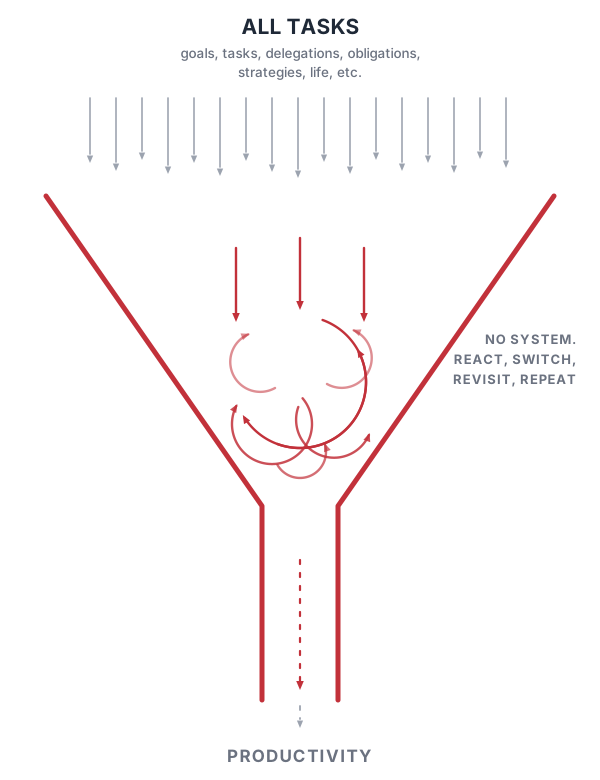
Everything churns

Tasks get revisited, re-decided and reshuffled. The day fills up and the things that mattered never move.

Diagram: all tasks pour into a funnel and churn without being ranked, so only a trickle of productivity comes out.
With Red Urchin

Everything gets ranked

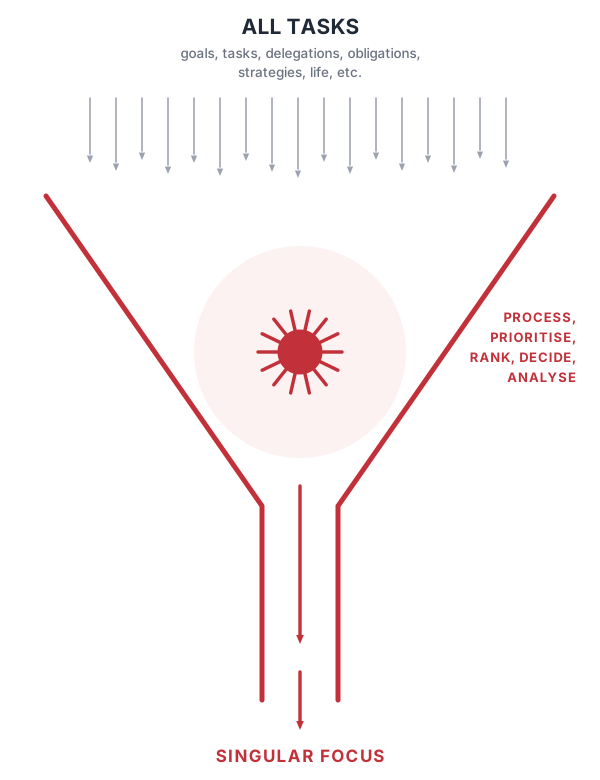
Every input lands on one page, takes an A/B priority, and comes back out as the single next thing to do.

Diagram: all tasks pour into a funnel, Red Urchin processes and ranks them, and singular focus comes out.

Read the Red Urchin system →

Already using something else?

Why Red Urchin

Built around one habit: know what matters today.

Everything else in the app exists to feed that one page.

To Do Today page

A dedicated page for every date. Main tasks, outside activities and items due from others, each prioritised A/B and reordered by drag and drop.

Live calendar panel

Your linked calendar sits right beside your task list, all-day events pinned to the top, overlapping meetings shown side by side.

Recurring made simple

Daily, weekly, monthly or yearly — set it once and every instance carries its priority, reminders and attachments with it.

Communications, Goals & Meetings

Purpose-built subpages that feed follow-ups straight back onto your To Do Today list — nothing gets tracked twice.

Search everything

One search box across every page and subpage, ranked by relevance and by what's still active — click a result to jump straight there.

Contacts stay in sync

Link a Google or Microsoft 365 contact to any Communications page — it's the source of truth, so details update automatically. No re-typing, ever.

Know the day's load before you commit

Give any task a time in minutes and each section totals what's still outstanding. You can see you've already promised six hours of work before you agree to the seventh thing.

One click and the page sorts itself

The urchin button clears out blank lines and re-sorts every section — unfinished before finished, A1 down to unprioritised. No dragging rows around to tidy up after yourself.

It points at one thing, not forty

The lowest unfinished A priority in each section shows in bold. Come back after a meeting, a day off or a fortnight away and the next action is still the one in bold.

New: Micro Goals

Small enough to actually do. Tracked so you don't forget you meant to.

Most things that matter aren't one task or one deadline — they're a handful of repetitions a week. Three client calls. Two gym sessions. One difficult conversation. Micro Goals sit between your long-term Goals and your daily To Do Today page and hold exactly that.

Give a goal a weekly or monthly target of up to seven, and each one becomes a box. Click a box and it turns into a real task on a day you choose — in your main list or your outside activities — not a tick in a separate habit app you'll stop opening by March.

Progress then takes care of itself. A box goes grey the moment it's scheduled and red the moment that task is completed, read live from the task itself. At a glance you know you're three of five through the week, with two days left to find them.

Weekly & monthly Up to 7 per goal One click to schedule Copy forward each period

How Micro Goals work →

Weekly Micro Goals — Week Ending 20 Sep
Call 3 prospective clients
Walk 30 minutes
How it works

From signup to sorted, in minutes.

1

Create your account

Start your 14-day free trial. Your data is centrally stored and synced from day one.

2

Open today's page

Red Urchin opens straight to today's To Do Today page, ready for entries.

3

Add and prioritise

Enter tasks, assign A/B priorities, link to Comms, Goals or Meetings as needed.

4

Let it carry forward

Recurring tasks, follow-ups and forwarding rules keep tomorrow's page ready before you get there.

What's new

Latest updates

Product news, releases and announcements.

See all news →

The system behind the app

The app is half of it. The system is the other half.

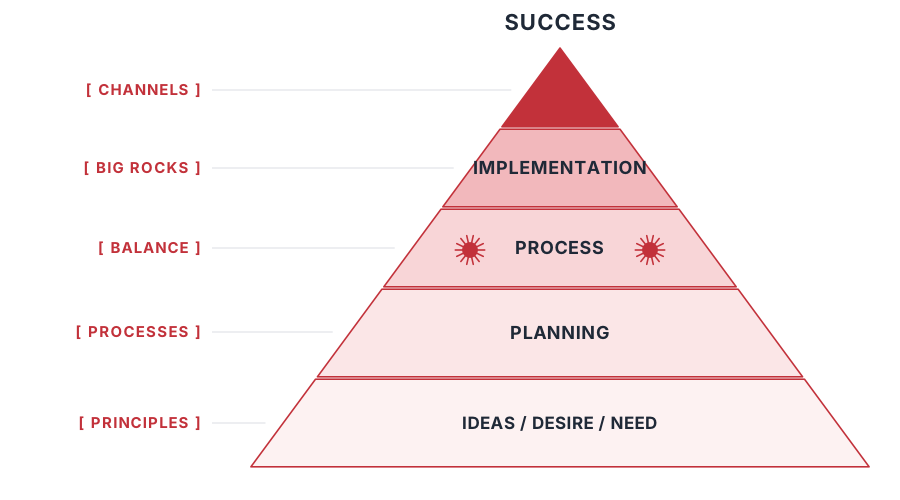
Red Urchin runs on a set of principles, pillars and processes refined with thousands of users since 2011. Ideas and needs at the base, then planning, process, implementation — each layer only works if the one below it is in place.

The application handles the mechanics: capture, priority, recurrence, follow-ups. The system tells you what to put in it, and in what order.

KISS Holistic Accessible Big Rocks Channels

Read the system

Pyramid diagram: ideas, desire and need at the base, then planning, process, implementation and success at the peak, mapped to principles, processes, balance, big rocks and channels.
Principles hold up processes, processes hold up balance, and balance is what lets the big rocks move.

Get your first To Do Today page in under a minute.

Works in any browser. Your data, synced everywhere.

No charge for 14 days. Cancel any time before it ends.